Home › Guides › Choosing security software
How to choose security software without being sold to
What the independent laboratories actually measure, which advertising claims carry no information at all, and the four billing questions to settle before you type a card number.
No partner links on this page
This guide is purely informational and carries no commercial links. The site as a whole is funded by affiliate commission — see the affiliate disclosure — but nothing below earns us anything, whatever you decide to do.
Start with what you already have
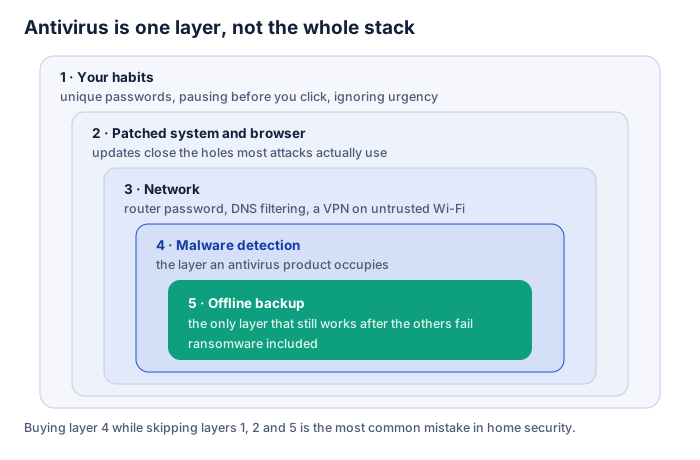
Windows 10 and Windows 11 include Microsoft Defender Antivirus, enabled by default and free, together with a firewall. macOS screens applications before they run and carries its own malware removal component. Android scans applications from the Play Store. These baselines are not marketing; they are the default state of the machine.
That does not mean a paid product is pointless. It means the question is not “protected or unprotected” but “what does this add, and is the addition worth the subscription to me?” Anyone who frames it the first way is selling.
Read the laboratories, not the adverts
Two independent European institutes test consumer security products on a rolling basis and publish their methodology: AV-Comparatives in Austria and the AV-TEST Institute in Germany. Their reports are free to read. Three numbers matter, and they have to be read together:
- Protection rate — how much of a large, current malware sample was stopped. Almost all mainstream products score highly; small differences here matter less than the marketing implies.
- False positives — how often harmless files were flagged as dangerous. This is the number people ignore and then regret, because a product that quarantines your own work is a daily problem rather than a theoretical one.
- Performance impact — how much the product slows common tasks. It is measured on standard hardware, so treat it as a comparison between products, not a prediction for your laptop.
Read the current report yourself. A test result is a snapshot, and a claim of “award-winning protection” on a vendor’s page tells you nothing about the test, the year or the category.
Claims that carry no information
- “Blocks 100% of threats.” Nothing does, over time and across every category.
- “Military-grade encryption.” Not a technical standard. Usually it means AES-256, which is also what everyone else uses.
- “Zero-day protection” as a distinguishing feature. Every mainstream engine does behavioural detection. The question is how well, and only a test answers that.
- Threat counters and scan animations. Designed to be watched, not to inform.
- “Your PC is at risk” before anything has been scanned. That is an advertisement wearing the costume of a diagnosis.
- Star ratings on review sites with affiliate links. Including ours, in principle — which is why this site publishes no ratings at all. We do not run a laboratory, so we do not score products as though we did.
Bundle or separate tools?
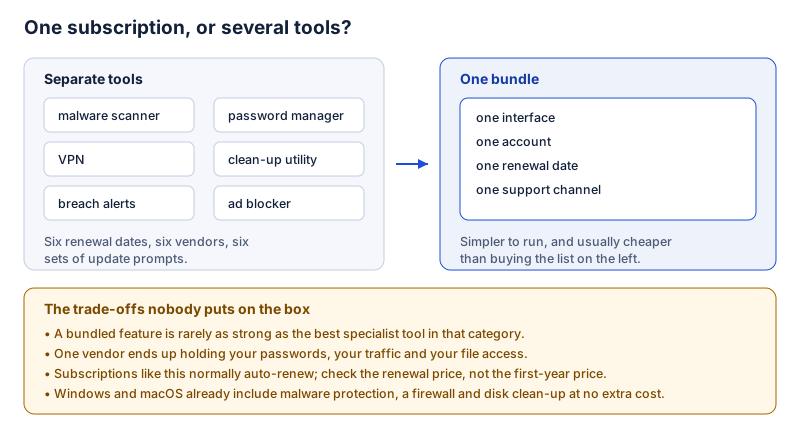
A bundle is genuinely simpler and usually cheaper than buying the same categories separately, and for a household that would otherwise run nothing it is a clear improvement. The costs are that a bundled component is rarely as good as the best specialist tool, that one company ends up holding your passwords, your traffic and file-level access to your machine, and that leaving means moving several things at once. Check before you buy that you can export a password vault; that is the component that is hardest to leave.
The four billing questions
- What is the renewal price? Not the first-year price. Introductory pricing is normal in this market; the renewal is what you will actually pay year after year.
- Does it renew automatically, and where is the switch? Assume yes unless the checkout says otherwise, and find the setting on the day you subscribe rather than eleven months later.
- What exactly does the plan cover? Number of devices, which operating systems, and whether the feature you are buying it for exists on your platform. Feature lists differ between Windows, macOS, Android and iOS more than the marketing suggests.
- What is the refund window, and how do you claim it? Read the vendor’s own terms rather than a summary on a page like this one, and put the date in your calendar.
In the EU you also have information rights before purchase and, for most distance contracts, a statutory withdrawal period — though digital services can be an exception where you agree to immediate performance. Read what you tick at checkout.
A short buying checklist
- Have I fixed the free things first: updates, start-up list, extensions, backup?
- Have I read a current independent test rather than a vendor page?
- Do I know what this adds to what my operating system already does?
- Do I know the renewal price and how to cancel?
- Can I get my data — passwords especially — back out if I leave?
- Am I buying because of a measured need, or because a page made me anxious?
The last question is the important one. Fear is the standard sales technique in this category, and noticing it is most of the defence.
Our main article looks at one such suite in detail. It carries partner links and is labelled as commercial content throughout, so you can weigh it accordingly.