Home › Guides › Slow computers
Nine reasons a computer slows down, in the order worth checking them
Ordered from the cheapest and quickest test to the most expensive fix. Work down the list and stop when the machine is usable again; most people never reach the bottom.
No partner links on this page
This guide is purely informational and carries no commercial links. The site as a whole is funded by affiliate commission — see the affiliate disclosure — but nothing below earns us anything, whatever you decide to do.
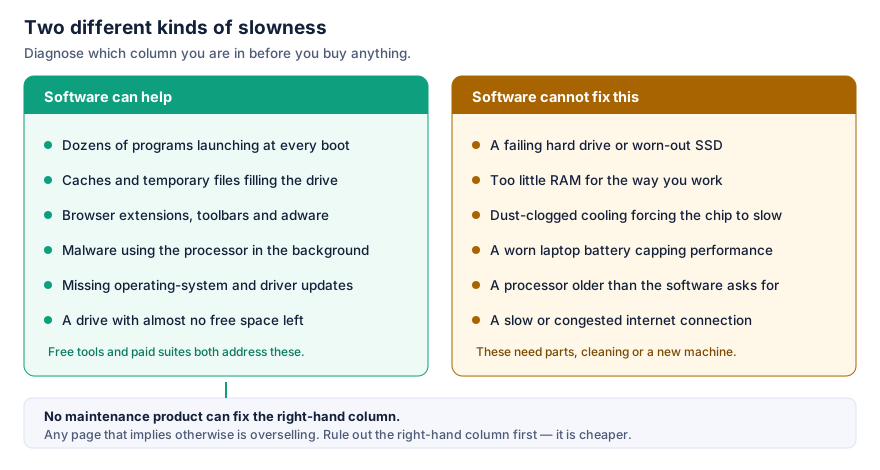
1. The machine has not been restarted in weeks
Closing the lid is not restarting. Memory leaks accumulate, pending updates queue up waiting for a reboot, and driver state drifts. Restart properly, let the updates finish, and retest before you conclude anything else. This is free and it resolves a genuinely large share of complaints.
2. Pending operating-system updates
A half-applied update is worse than either state. Install what is waiting, restart, and let the machine settle for ten minutes — indexing and clean-up tasks often run immediately afterwards and will make the machine feel slower for exactly that period. Judge the result after it has settled, not during.
3. Too many programs starting automatically
Every application that installs itself into the start-up list competes for the same processor and disk in the first minutes after you sign in. Cloud-storage clients, chat apps, games launchers, printer utilities and updaters are the usual suspects.
- Windows: Task Manager (Ctrl + Shift + Esc), Start-up apps tab. Each entry has an impact rating.
- macOS: System Settings › General › Login Items.
Disable entries one at a time, and only ones you recognise. Disabling does not uninstall anything; you can put it back. If you do not recognise a name, search for the file name before touching it — drivers and security software live in these lists too.
4. Browser extensions
If the browser is slow but the rest of the machine is fine, this is almost always the reason. Extensions run inside every page you load. Coupon finders, shopping helpers, and anything installed alongside something else are the ones to look at first.
Open your browser’s extensions page, disable everything, and see how it feels. Re-enable only what you actually use. While you are there, check that your home page and default search engine are still what you chose — a change you did not make is a sign that something installed itself.
5. The drive is nearly full
Modern file systems and solid-state drives both behave badly with very little free space; writes slow down and background maintenance cannot run. Aim to keep roughly ten per cent of the drive free. The largest wins are usually old downloads, duplicated photo and video libraries, and previous-version folders left by major operating-system upgrades — both Windows and macOS have a built-in tool for reclaiming these, so there is no need to buy one.
6. Not enough memory for the way you work
This is the most misdiagnosed cause on the list. The symptom is distinctive: the machine is fine, and then suddenly the pointer still moves but windows stop responding.
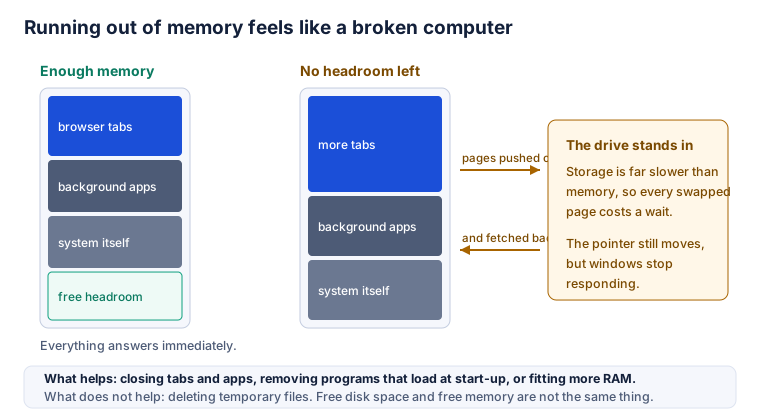
Watch the memory figure in Task Manager or Activity Monitor while the machine is struggling. If it is pinned near its limit, no amount of file deletion will help: free disk space and free memory are different things. Close what you are not using, cut the start-up list, and consider whether the machine accepts more memory. Many thin laptops do not, which is worth knowing before you buy the next one.
7. A mechanical hard drive
If the machine has a spinning hard disk rather than flash storage, that single fact probably explains most of what you are experiencing, and no software will change it. On Windows, the Optimise Drives panel names each drive as either a hard disk drive or a solid-state drive; on a Mac, System Information lists the storage type. Replacing a mechanical drive with an SSD is the single most effective upgrade available for an older computer, and it is usually cheaper than a year or two of subscriptions.
8. Malware, adware, and things that are technically legal
An infection that mines cryptocurrency or injects advertising shows up as a constantly running fan, a battery that drains faster than it should, and a browser full of pages you did not open. Run a full scan with the protection you already have — Microsoft Defender is built into Windows and costs nothing — before buying a second product to do the same job.
Uninstall anything in your applications list you do not recognise and did not choose, and be especially suspicious of “PC cleaner” and “driver updater” software that appeared on its own. Several families of that kind exist mainly to create the alarming report they then offer to fix.
9. Heat, dust and a tired battery
When a processor gets too hot it deliberately slows down to protect itself. A laptop that is hot underneath, with a fan running constantly, is probably doing this. Clear the vents, use it on a hard surface rather than a duvet, and consider having the inside cleaned if it is several years old. Similarly, a badly degraded laptop battery can cause a machine to limit performance on some models. Neither of these is a software problem and no subscription will address them.
What we would not bother with
- Defragmenting a solid-state drive. There is nothing to defragment; the rewriting adds wear. Modern Windows already applies the right maintenance to each drive type on a schedule.
- Registry cleaners. We are aware of no credible measurement showing a speed benefit on a modern Windows installation.
- “RAM boosters”. Forcibly emptying memory usually makes things slower, because the operating system then has to read back what it had sensibly cached.
- Anything that finds hundreds of “errors” the moment it is installed. That number is a sales technique, not a diagnosis.
How to know whether anything you did worked
Measure before and after, with the same test. Time three cold boots. Time opening the application you care about. Count the seconds from clicking a link to the page being readable. Change one thing at a time. Without a baseline you are relying on impressions, and impressions are exactly what optimisation marketing is designed to influence.
The longer article on this site covers where a paid security and maintenance suite fits into all of this — and, since it recommends one, it is labelled as commercial content.