How to spot a phishing message
Filters catch most of it. The ones that get through are the ones designed to get through, and they all share the same five parts.
No partner links on this page
This guide is purely informational and carries no commercial links. The site as a whole is funded by affiliate commission — see the affiliate disclosure — but nothing below earns us anything, whatever you decide to do.
Phishing works on attention, not on ignorance. The messages that succeed arrive when you are busy, refer to something plausible, and ask for one small action. Knowing the anatomy helps, but the habit at the end of this guide helps more, because it works even when you are tired.
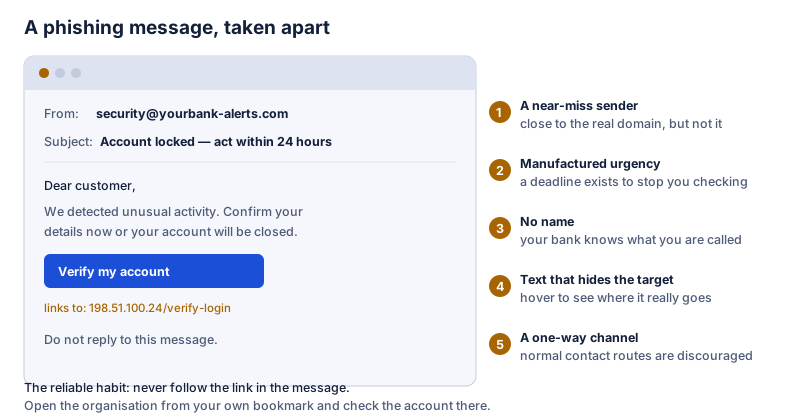
1. A sender address that is close, but not right
Look at what comes after the final @ sign, and read it right to left. yourbank-alerts.com is
not yourbank.com, and yourbank.com.secure-login.net belongs to
secure-login.net. The display name is worth nothing: anyone can put any name on a message.
2. Manufactured urgency
A deadline exists to stop you checking. “Within 24 hours”, “your account will be closed”, “final notice”, “unauthorised payment of €499 — cancel now”. Real organisations do send time-sensitive messages, but they do not depend on you acting inside the message itself. Treat urgency as the signal to slow down, not to hurry.
3. No name, or the wrong name
“Dear customer” from a company that has known your name for years is a poor sign. Be aware that the opposite is not reassurance: after a data breach, attackers often do know your name, your address and what you bought. A message that knows something about you is not thereby genuine.
4. Link text that does not match its destination
Hover over the link on a computer, or press and hold on a phone, and read where it actually goes before tapping. Watch for bare IP addresses, unfamiliar top-level domains, long strings of random characters, and shortened links that hide the destination entirely. On a phone this is harder and that is why phones are targeted.
5. A demand to act inside the message
The whole scheme depends on you using the attacker’s route rather than your own. Anything asking you to sign in, confirm details, pay an invoice or install something, all without leaving the message, deserves suspicion regardless of how well it is written.
The habit that works
Never use the link. Go to the organisation yourself. Open your bank, your parcel carrier or your tax office from your own bookmark, from the app you already have, or by typing the address. If the message is genuine, whatever it refers to will be waiting for you there. If there is nothing there, you have your answer and you have lost fifteen seconds.
This works even when you are tired, even when the message is well written, and even when it correctly knows your name and your last purchase. It is the only defence on this page that does not depend on you spotting something.
Variants worth knowing about
- Text messages (smishing). Usually a missed delivery or a small customs fee. The small amount is deliberate: it is below the threshold at which you would stop to think.
- Phone calls (vishing). Someone claiming to be from your bank or from technical support, often after an e-mail, to lend the story weight. No bank will ever ask you to move money to a “safe account”. Hang up and call the number printed on your card.
- Multi-factor fatigue. Repeated approval prompts until you tap one to make them stop. A prompt you did not trigger means someone already has your password; deny it and change the password.
- Fake support pop-ups. A browser page claiming your computer is infected and showing a number to call. No operating system diagnoses an infection through a web page. Close the tab; if it will not close, quit the browser entirely.
- Invoice fraud at work. A supplier’s bank details have “changed”. Verify by phoning a number you already had, never one in the message.
If you have already clicked
- Do not panic, and do not delay. Speed limits the damage more than anything else.
- If you entered a password, change it immediately on the real site, and change it anywhere else you reused it. Reuse is what turns one mistake into several.
- Turn on multi-factor authentication on the affected account if it is not already on.
- If you entered card details, contact your bank now and ask them to block the card.
- If you installed something, disconnect from the network and run a full scan with the protection already on the machine.
- Check the account’s recovery settings — alternative e-mail addresses, forwarding rules, app passwords. Attackers add their own so they can return after you change the password.
- Report it to the organisation that was impersonated; most have an address for this.
What actually reduces the risk over time
- A password manager, so every account has a different password and a fake site cannot get one that works elsewhere.
- Multi-factor authentication everywhere it is offered, with app-based or hardware methods preferred over SMS.
- Keeping the browser and operating system updated.
- Backups that are not permanently connected, so that ransomware is an inconvenience rather than a catastrophe.
Security software contributes: web filtering blocks known malicious sites and mail filters remove most attempts before you see them. Neither is a substitute for the habit above, because the messages that reach your inbox are precisely the ones the filters did not recognise.